
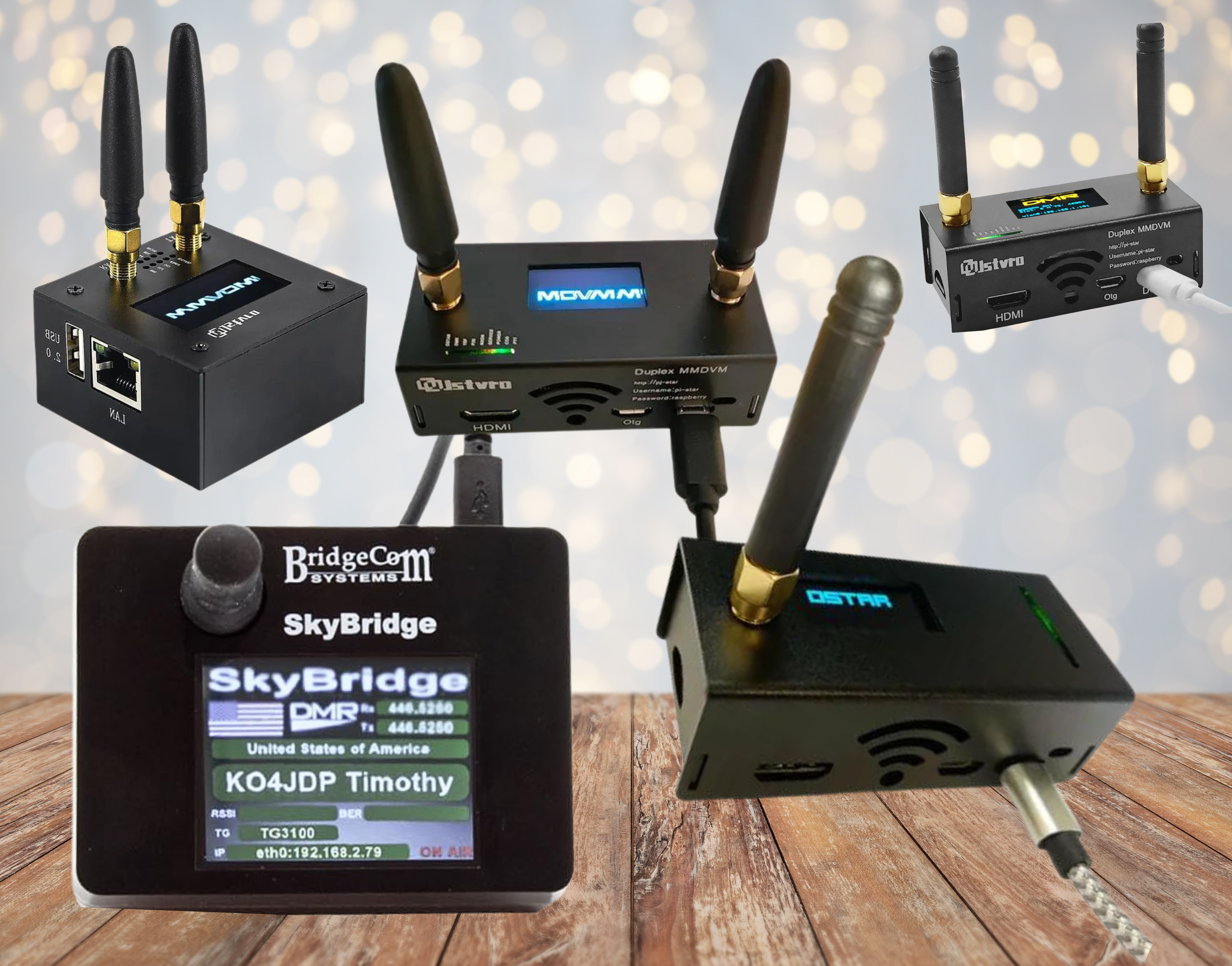
Amateur radio hotspots are transforming how operators connect by combining traditional RF communication with internet-based digital voice networks. These compact devices allow you to link a handheld or mobile radio to worldwide communication systems using Voice over Internet Protocol (VoIP).
Instead of relying only on local repeaters, hotspots create a personal gateway to global digital networks. With just a low-power RF link and an internet connection, operators can communicate across cities, countries, or continents.
Hotspots support many popular digital voice systems including DMR, System Fusion (C4FM), D-Star, P25, NXDN, AllStar, IRLP, and EchoLink. This makes them one of the most flexible tools in modern amateur radio.
What Is an Amateur Radio Hotspot in Simple Terms
An amateur radio hotspot is a small personal gateway device that connects a handheld or mobile radio to internet-based digital voice networks. It acts like a miniature repeater that links local radio transmissions to global communication systems using VoIP technology. With a hotspot, operators can talk to other amateur radio users worldwide even when no local repeater is available.
What Is an Amateur Radio Hotspot
An amateur radio hotspot is a personal digital gateway that connects your radio to internet-based voice networks. It functions like a miniature repeater that links local RF transmission to global communication systems.
Most hotspots are small desktop devices that operate on UHF frequencies and connect to your home network through Wi-Fi or Ethernet. Because they transmit at very low power, they are ideal for indoor use.
Hotspots allow operators to access digital voice systems even when no local repeater is available.
What Hardware Is Inside a Hotspot
Most hotspots contain three primary components. A single-board computer, commonly a Raspberry Pi, handles network communication and signal processing.
A digital radio modem or low-power transceiver receives and transmits RF signals from your handheld or mobile radio. A network interface connects the device to the internet through Wi-Fi or wired Ethernet. Together, these components allow the hotspot to translate radio signals into digital network data and back again.
How Amateur Radio Hotspots Work Step by Step
The communication process is straightforward but powerful. Your radio transmits audio to the hotspot on a local frequency. The hotspot converts the signal into digital data using VoIP technology.
The digital data travels across the internet to a talkgroup, reflector, or node. Other connected systems receive the data and convert it back into audio. The result is real-time global communication using very low RF power.
Why Amateur Radio Operators Use Hotspots
Hotspots remove distance limitations and provide access to digital networks anywhere internet service is available.
Operators use hotspots to participate in worldwide conversations, join scheduled nets, experiment with digital voice modes, and maintain communication in areas with limited repeater coverage. They are especially useful for apartment dwellers, travelers, and operators with antenna restrictions.
Advantages of Amateur Radio Hotspots
Hotspots provide worldwide communication independent of local repeater range. They support multiple digital voice modes from a single device. Urban signal reliability improves because the RF path between radio and hotspot is short.
Configuration and control are flexible through web interfaces, apps, or radio commands. Their compact size makes them portable and easy to deploy anywhere.
Disadvantages and Limitations of Hotspots
Some hotspots support only specific digital modes, so compatibility must be confirmed before purchase. Configuration may require basic networking knowledge.
Operation depends on internet connectivity. Hotspots do not replace high-power repeaters for wide-area RF coverage. Understanding these limitations helps ensure realistic expectations.
What Are Reflectors and Talkgroups
Reflectors and talkgroups act as virtual meeting spaces on digital networks. When connected, your transmission is shared with everyone linked to that channel.
These shared communication spaces allow group conversations across wide geographic areas. Many reflectors are organized by region, interest, or operating group. They function like global radio chat rooms.
Types of Amateur Radio Hotspots
Simplex hotspots transmit and receive on one frequency and are the most common type for personal use. Duplex hotspots allow simultaneous transmit and receive, functioning more like miniature repeaters.
Mode-specific hotspots are designed for systems such as IRLP or EchoLink. Multi-mode hotspots support several digital standards and offer the greatest flexibility.
Popular Hotspot Options and Compatibility
ZumSpot supports several digital voice systems and is widely used with System Fusion, DMR, and D-Star.
ClearNode connects analog radios to digital networks using built-in conversion software.
Nano-Node focuses on IRLP and EchoLink connectivity.
BridgeCom MAX supports multiple digital modes and provides an integrated display and simplified configuration.
Duplex hotspots offer advanced repeater-style operation.
Always confirm compatibility with your radio and preferred network.
How Operators Control Hotspots
Many hotspots can be controlled using DTMF tones sent from the radio keypad. These commands allow connection changes, status checks, and network switching. Additional control methods include web dashboards, smartphone apps, and remote configuration tools. Custom command settings allow operators to personalize operation.
Cost of Amateur Radio Hotspots
Pricing varies depending on features, supported modes, and hardware design. Basic simplex hotspots are generally affordable, while advanced multi-mode or duplex systems cost more. When comparing models, consider compatibility, ease of setup, expandability, and supported networks rather than price alone.
How to Choose the Right Amateur Radio Hotspot
Selecting the right amateur radio hotspot requires balancing compatibility, operating goals, and long-term flexibility. The most important consideration is digital mode support. Not all hotspots support every digital voice system, so operators should first confirm compatibility with their radio and preferred network, whether that is DMR, System Fusion, D-Star, AllStar, or another platform.
Ease of configuration is another key factor. Some hotspots offer simple browser-based setup tools and automatic configuration, while others require more advanced networking knowledge. Beginners typically benefit from models that provide guided setup and clear management interfaces.
Operators should also consider whether simplex or duplex operation is appropriate. Simplex hotspots are sufficient for most personal indoor use and remain the most common choice due to their affordability and simplicity. Duplex hotspots provide repeater-style simultaneous transmit and receive capability, which offers enhanced performance but introduces additional cost and configuration complexity.
Hardware features may also influence the decision. Integrated displays, built-in Wi-Fi, remote management capability, and multi-mode support can significantly improve long-term usability. Choosing a hotspot with broader digital compatibility often provides the greatest flexibility as operating interests evolve.
Ultimately, the best hotspot is one that supports your current radio, matches your technical comfort level, and allows room for future expansion without requiring replacement.
Hotspots and Traditional Ham Radio
Hotspots extend traditional amateur radio rather than replace it. Communication still occurs locally over RF between your radio and the hotspot. The internet simply carries the signal beyond normal radio range. This hybrid approach preserves radio operation while enabling global connectivity.
Who Should Use a Hotspot
Hotspots are ideal for operators without access to digital repeaters, those with antenna restrictions, portable operators, digital voice enthusiasts, and anyone interested in worldwide communication.
They provide one of the easiest ways to explore digital amateur radio.
Real-World Applications of Amateur Radio Hotspots
Amateur radio hotspots are most valuable in situations where traditional repeater access is limited or unavailable. Operators living in apartments or antenna-restricted neighborhoods frequently rely on hotspots to maintain reliable access to digital voice networks without installing outdoor antenna systems.
Portable operators use hotspots while traveling so they can remain connected to their preferred talkgroups and communication networks regardless of location. Emergency preparedness groups often deploy hotspots as supplemental communication tools when infrastructure coverage is limited or compromised.
In rural environments, hotspots may provide the only practical method for accessing modern digital voice systems. Many amateur radio operators also use them for routine communication, scheduled nets, and international conversations from a simple low-power station.
Common Hotspot Operating Problems and Solutions
Most hotspot performance issues are related to configuration or signal conditions rather than hardware failure. Distorted or choppy audio is often caused by transmitting too close to the hotspot or using excessive transmit power. Reducing transmit power and maintaining a small physical separation between the radio and hotspot typically resolves this issue.
Network connection failures are commonly caused by incorrect Wi-Fi configuration, unstable internet access, or mismatched digital mode settings. Verifying network connectivity and confirming that radio and hotspot configurations match usually restores operation.
Difficulty accessing talkgroups or reflectors is typically the result of incorrect frequency programming, mismatched digital parameters, or improper network selection. Carefully reviewing configuration settings will resolve most access problems.
Systematic verification of power, network connectivity, and configuration parameters will correct the majority of hotspot operating issues.
Best Operating Practices for Reliable Hotspot Performance
Hotspots operate over very short RF distances, so low transmit power is recommended for clean audio and stable communication. Maintaining a small physical separation between the radio and hotspot prevents receiver overload and improves signal quality.
Operators should verify frequency settings, digital mode configuration, and network status before transmitting. Initial testing on low-traffic talkgroups allows adjustment of audio levels and configuration settings without interrupting active conversations.
Consistent configuration practices and careful operating technique ensure reliable long-term hotspot performance.
Frequently Asked Questions About Amateur Radio Hotspots
How much range does a hotspot provide?
Hotspots operate at extremely low RF power and typically cover only a room or small indoor area. They are designed for personal access rather than wide-area coverage.
Do hotspots require internet access?
Yes. Hotspots rely on internet connectivity to route digital voice traffic between networks and operators.
Can a hotspot replace a repeater?
No. A hotspot is a personal access device, while repeaters provide broad RF coverage. The two systems serve different purposes and often complement each other.
What radio can be used with a hotspot?
Any radio compatible with the digital mode supported by the hotspot can be used when frequencies and network settings are configured correctly.
Are hotspots legal in amateur radio?
Yes, when operated within amateur radio regulations and approved frequency allocations.