
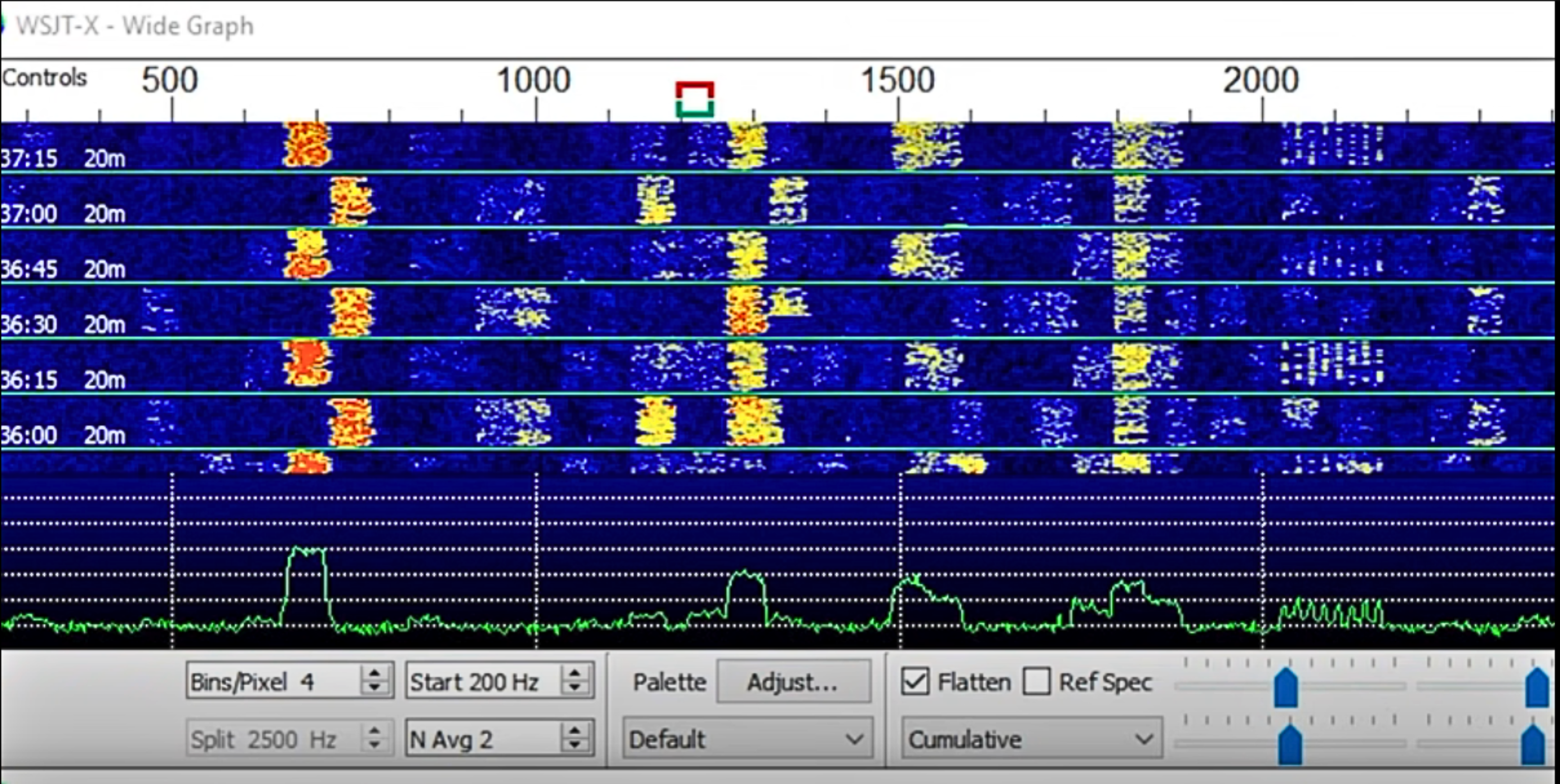
FT8 digital mode is one of the most widely used communication methods in amateur radio today. Powered by the WSJT-X software, it allows operators to complete reliable contacts using extremely weak signals that are often inaudible to the human ear. FT8 digital mode is especially popular for long-distance communication, low-power operation, and difficult propagation conditions.
FT8’s reliable performance can be attributed to its timed 15-second transmission and reception cycles. This allows for efficient and consistent communication. The WSJT-X software, developed through the contribution of the amateur radio community, supports not only FT8 but also other modes optimized for different types of radio-wave propagation.
This article will explore the FT8 digital mode in depth, its advantages, features, and benefits of the WSJT-X software. Understanding FT8 and its application with the WSJT-X software will enhance your communication capabilities.
New to digital operation? Read our Complete Guide to Digital Modes.
Who Uses FT8 and Why It Became So Popular
FT8 is widely used by amateur radio operators who want reliable contacts with minimal power, limited antennas, or difficult propagation conditions. It is especially popular among DXers, portable operators, and stations operating from restricted locations such as apartments or HOA environments.
Its fast automated contact process allows operators to confirm many contacts in a short time, making it ideal for award chasing, band monitoring, and propagation testing.
What Makes FT8 Different From Traditional Digital Modes
FT8 is fundamentally different from earlier digital modes because it is designed specifically for rapid, structured, weak-signal communication rather than extended conversation. Traditional digital modes often allow free-form messaging, but FT8 uses fixed message sequences that are optimized for reliability and speed.
The mode is engineered to decode extremely weak signals and complete contacts quickly using precise timing and automated sequencing. Instead of relying heavily on operator skill to interpret weak audio, FT8 uses advanced digital signal processing to extract usable information from signals that may be completely inaudible to the human ear.
This design makes FT8 one of the most efficient communication modes available for difficult propagation conditions.
Key Takeaways:
- FT8 is a digital mode widely used in amateur radio communication
- Powered by the WSJT-X software, FT8 enables reliable contacts under weak-signal conditions
- WSJT-X implements various modes, including FT8, for efficient and optimized communication
- FT8’s timed transmission cycles allow for consistent communication even in challenging propagation conditions
- Understanding FT8 and the WSJT-X software enhances communication capabilities for ham radio operators
What is FT8 Digital Mode?
FT8 is a digital mode used in amateur radio communication. It is designed for weak-signal conditions and optimized for HF DXing.
FT8 utilizes timed 15-second transmission and reception cycles, enabling efficient and reliable communication even in challenging propagation conditions. Also, this digital mode has gained widespread popularity among amateur radio operators for making contacts around the world.
FT8’s timed transmission and reception cycles ensure that even weak signals can be received and decoded accurately, making it ideal for long-distance communication on HF bands. It uses a series of predetermined messages to exchange call signs, signal strength, and other necessary information.
With its narrow bandwidth and robust error correction techniques, FT8 allows for efficient use of limited frequency resources and better resistance against signal degradation and interference. This makes it a valuable tool for amateur radio operators seeking reliable communication under challenging conditions.
How FT8 Decodes Extremely Weak Signals
FT8 is specifically engineered to recover information from signals that may be impossible to hear through a speaker. Instead of relying on audio clarity, the software analyzes extremely small changes in frequency and timing within the signal.
Because FT8 messages follow a fixed structure and predictable timing pattern, the decoding process can identify valid signal elements even when they are buried in background noise. This allows reliable decoding at signal levels that would normally be considered unusable for voice communication.
This weak-signal decoding capability is one of the main reasons FT8 is widely used for long-distance communication and low-power operation.
Typical FT8 Signal Strengths Explained
FT8 signals are commonly reported in negative decibels relative to the noise floor. Most successful FT8 contacts occur between about -5 dB and -24 dB. Signals below -20 dB are often completely inaudible but still decodable by WSJT-X.
Typical interpretation:
- -5 to -10 dB — strong signal
- -10 to -18 dB — normal working range
- -18 to -24 dB — very weak but usable
- Below -24 dB — difficult but sometimes decodable
This ability to decode extremely weak signals is one of FT8’s defining characteristics.
Advantages of FT8
FT8, as a digital mode for ham radio communication, offers several key advantages that make it a popular choice among operators. Let’s explore the benefits of using FT8:
- Excellent Sensitivity: FT8 provides exceptional sensitivity, enabling the detection of signals that are as much as 2 dB below the noise floor. This sensitivity allows operators to establish reliable contacts even in challenging weak-signal conditions.
- Efficient Bandwidth Usage: FT8 utilizes a narrow bandwidth, optimizing the use of limited frequency resources. This efficient use of bandwidth ensures that operators can make the most out of the available spectrum without causing unnecessary interference.
- Error Correction Techniques: FT8 incorporates advanced error correction techniques, making it more resilient to signal degradation and interference. These techniques enhance the reliability of communication, resulting in more successful QSOs.
- Versatility for Different Operating Scenarios: FT8 supports non-standard callsigns and certain popular contests, making it a flexible option for various operating scenarios. This versatility allows operators to adapt FT8 to their specific requirements and participate in engaging activities within the amateur radio community.
With these advantages, FT8 has proven to be a valuable mode in the ham radio landscape, providing operators with reliable and efficient communication capabilities.
Disadvantages of FT8
- Not Suitable for Real-Time Interactive Communication: FT8, by design, employs pre-defined message structures and timed transmission cycles. While it allows for reliable communication, it is not conducive to real-time, interactive conversations.
- Crowded Bands and Reduced Casual Conversations: Due to its popularity, FT8 has led to overcrowding on the bands. This crowding has resulted in reduced opportunities for casual conversations, as the focus tends to be on making contacts rather than engaging in extended discussions.
These pros and cons of FT8 highlight the strengths and limitations of this digital mode. Ultimately, the choice of whether to utilize FT8 in ham radio communication relies on individual preferences and the specific communication requirements of the amateur radio operator.
| Advantages of FT8 | Disadvantages of FT8 |
|---|---|
| Contacts under weak-signal conditions | Not suitable for real-time interactive communication |
| Efficient bandwidth usage | Crowded bands and reduced casual conversations |
| Support for non-standard callsigns and contests |
Real-World Example of a Weak-Signal FT8 Contact
Example QSO sequence:
CQ K1ABC FN31
W9XYZ K1ABC -18
K1ABC W9XYZ -15
W9XYZ K1ABC RRR
K1ABC W9XYZ 73
This entire confirmed contact typically completes in about 60–90 seconds using signals that may not be audible to the operator.
WSJT-X Software for FT8
WSJT-X is the primary software used to operate the FT8 digital mode and other weak-signal communication modes in amateur radio. It is open-source software specifically designed to enable reliable contacts under extremely low signal conditions. WSJT-X evolved from earlier programs such as WSJT and WSPR and adds full rig control, automated message sequencing, and advanced signal decoding.
The software allows operators to monitor activity, decode multiple signals simultaneously, and complete structured contacts with minimal manual input. Its interface provides real-time decoding, frequency control, transmit management, and logging integration.
WSJT-X is widely used by both beginners and experienced operators because it simplifies digital operation while delivering highly reliable performance in weak-signal environments. It supports FT8 along with several other specialized modes designed for different propagation conditions and operating goals.
How to Set Up FT8 Using WSJT-X
Setting up FT8 requires connecting your radio to a computer and configuring WSJT-X so it can transmit and decode signals properly. Most modern transceivers connect using a USB cable that carries both audio and control signals.
First, install WSJT-X and select the correct audio input and output devices so the software can receive and transmit sound through the radio. Next, configure the CAT control settings so the software can control frequency and transmit functions automatically.
Accurate computer time is critical because FT8 transmissions occur in precise time intervals. Time synchronization software or automatic internet time servers should be used to maintain correct system time.
Once audio levels, radio control, and timing are configured, the software can begin decoding signals immediately when monitoring an active FT8 frequency.
Minimum Equipment Required for FT8 Operation
To operate FT8 successfully, you need:
- HF or VHF transceiver with stable frequency control
- Computer capable of running WSJT-X
- Radio-to-computer audio interface (often built into modern radios)
- Accurate computer time synchronization
- Suitable antenna for the operating band
Many modern radios connect using a single USB cable that handles both audio and control.
Recommended Radio Settings for Clean FT8 Signals
Transmit audio levels should be adjusted carefully to prevent overdriving the transmitter. Excessive audio drive creates distortion that reduces decoding success for other stations.
Most operators use stable, moderate transmit power and avoid speech processing or audio compression. Clean, steady signal output produces better decoding performance than high power with distortion.
Using the correct USB or digital mode setting on the radio ensures the transmitted signal remains narrow and properly formatted.
Recommended Power Levels for FT8 Operation
Most FT8 contacts do not require high transmit power. Typical operating power levels:
- Local or strong signals — 5 to 20 watts
- Normal DX — 20 to 50 watts
- Difficult conditions — 50 to 100 watts
Clean signal quality is more important than maximum power. Overdriven transmit audio reduces decoding success.
How to Operate FT8
Operating FT8 is largely automated, but understanding the workflow helps ensure successful contacts. Begin by tuning your radio to a standard FT8 frequency and allowing WSJT-X to monitor incoming signals. The software will display decoded stations transmitting within the current cycle.
To make a contact, either respond to a calling station or initiate a CQ call. When responding, select the desired station in the software and enable transmission. WSJT-X automatically generates and sends the proper message sequence.
During the exchange, the software handles signal reports and confirmation messages in timed intervals. Once both stations acknowledge the contact, the QSO is complete.
Most FT8 contacts follow the same structured pattern, allowing quick and reliable communication even with weak signals.
Step-by-Step Example of a Typical FT8 Contact
A standard FT8 contact follows a predictable exchange sequence that allows operators to confirm communication quickly and efficiently.
First, a station calls CQ and includes its grid locator. A responding station replies with both call signs and a signal report. The original station acknowledges with a return signal report. The responding station confirms receipt, and the contact ends with a final acknowledgement.
Each transmission occurs within the timed FT8 cycle, and the software handles message formatting automatically. Operators simply select the responding station and allow the sequence to proceed.
This structured exchange allows reliable contact confirmation in a very short period of time, even when signals are weak.
Common FT8 Operating Frequencies by Band
FT8 activity typically concentrates within specific dial frequencies on each amateur band. Monitoring these standard frequencies helps operators find active stations quickly.
160 meters — 1.840 MHz
80 meters — 3.573 MHz
40 meters — 7.074 MHz
30 meters — 10.136 MHz
20 meters — 14.074 MHz
17 meters — 18.100 MHz
15 meters — 21.074 MHz
12 meters — 24.915 MHz
10 meters — 28.074 MHz
6 meters — 50.313 MHz
Operating near these frequencies ensures maximum activity and improves contact opportunities.
Best Bands for FT8 by Time of Day
Band activity changes with propagation:
- Nighttime — 80m, 40m, 160m
- Daytime — 20m strongest worldwide
- Afternoon / early evening — 15m and 17m
- High solar activity — 10m and 12m open globally
Monitoring multiple bands improves contact opportunities.
Common Beginner Mistakes When Operating FT8
New FT8 operators often encounter issues that reduce decoding performance or prevent successful contacts. One of the most common mistakes is incorrect computer time synchronization, which disrupts transmission timing.
Another frequent issue is excessive transmit audio drive, which creates distorted signals that are difficult to decode. Improper radio mode selection or incorrect audio device configuration can also prevent proper communication.
Some operators attempt to transmit at maximum power when a clean, properly adjusted signal would be more effective. Careful configuration and monitoring of signal quality significantly improves results.
FT8 Operating Etiquette
Proper operating practices improve efficiency:
- Avoid calling over ongoing QSOs
- Use appropriate transmit power
- Do not repeatedly call stations not responding
- Confirm grid locator accuracy
- Monitor before transmitting
Following standard operating practices keeps FT8 segments organized.
Why Accurate Time Synchronization Is Critical
FT8 transmissions occur in precisely timed intervals, which means every station must be synchronized to the same clock. If a station transmits even slightly out of alignment with the timing sequence, other stations may not decode the signal correctly.
Computer clock drift is one of the most common causes of decoding problems. Even small timing errors can prevent successful contacts or reduce decoding performance.
Maintaining accurate system time ensures that transmissions begin and end exactly when other stations expect them, allowing reliable decoding and smooth communication.
Key Features:
- Open-source software for amateur radio operators
- Optimized for weak-signal digital communication
- Inherits features from WSJT and WSPR
- Comprehensive rig control for enhanced functionality
- User-friendly interface for easy configuration and signal decoding
- Supports FT8 and other popular digital modes
To visualize the capabilities of WSJT-X, take a look at this example of an FT8 decoding table:
| Call Sign | Signal Report (dB) | Time (UTC) | Frequency (MHz) |
|---|---|---|---|
| K1ABC | -14 | 20:45 | 14.074 |
| W2XYZ | -16 | 21:12 | 7.076 |
| VE3LMN | -21 | 22:06 | 10.136 |
Example FT8 decoding table illustrating call signs, signal reports, times, and frequencies.
By leveraging the power of the WSJT-X software, ham radio operators can explore the vast potential of the FT8 digital mode and establish reliable contacts with fellow enthusiasts worldwide.
“The WSJT-X software opens up a world of possibilities for amateur radio operators, enabling seamless digital communication even under weak-signal conditions.”
Installation and Documentation
To begin using WSJT-X and FT8, you need to download the installation packages from the official WSJT-X website. These packages are available for Windows, Linux, and macOS, ensuring compatibility with a wide range of operating systems. The installation process is straightforward and user-friendly, allowing you to quickly set up the software and start exploring the world of FT8 digital mode.
WSJT-X User Guide
Once the installation is complete, it’s essential to familiarize yourself with the WSJT-X user guide. This comprehensive documentation provides detailed instructions and explanations of all the features and functionalities of WSJT-X and FT8. Whether you’re a beginner or an experienced ham radio operator, the user guide will serve as your go-to resource for help and guidance.
WSJT-X User Guide: The complete guide to using WSJT-X and FT8 effectively. Learn how to configure parameters, decode signals, make contacts, and explore other advanced features. Available in multiple languages for your convenience.
In addition to the user guide, the WSJT-X website also offers quick-start guides that provide concise instructions for getting started with WSJT-X and FT8. These guides are particularly helpful if you’re in a hurry or prefer a more streamlined approach.
FT8 Documentation in Multiple Languages
WSJT-X’s dedication to inclusivity is reflected in the availability of FT8 documentation in multiple languages. This ensures that users from different linguistic backgrounds can access valuable information and resources in their native languages. The translated documentation covers all aspects of using FT8, from installation to advanced operations, making it easier for non-English speakers to leverage the power of this digital mode.
Whether you’re a novice or an expert, taking the time to explore the installation and documentation resources provided by WSJT-X is crucial for maximizing your experience with FT8. From step-by-step instructions to detailed explanations, these resources empower you to make the most of WSJT-X and enjoy seamless communication using FT8.
Radiotoday Guide to HF Data on FT8 & PSK
The “Radiotoday Guide to HF Data on FT8 & PSK” serves as an indispensable companion for enthusiasts exploring digital communication. In addition to being written by seasoned experts in the field as a comprehensive guide. It offers a detailed roadmap for navigating the intricacies of two prominent digital modes: FT8 and PSK.
With clarity and precision of these modes, elucidating the underlying principles and techniques essential for successful operation. Readers are introduced to the powerful software tools WSJT-X and Fldigi. They serve as the primary platforms for engaging in FT8 and PSK communication respectively. Through step-by-step instructions and illustrative examples, users are guided through the installation, configuration, and optimization of these software packages. New operators become empowered to harness the full potential of digital communication on the HF bands.

The guide also explores practical considerations such as antenna selection, propagation characteristics, and operating etiquette. In addition to providing readers with a comprehensive understanding of the factors influencing their communication endeavors. Whether you’re a novice on your first digital QSO or an experienced operator looking to enhance your proficiency. This book equips you with the knowledge and skills needed to thrive in the dynamic world of HF data communication.
Packed with insights gleaned from years of hands-on experience, “Radiotoday Guide to HF Data on FT8 & PSK” is an invaluable resource for amateur radio enthusiasts. It offers a roadmap to unlock the exciting possibilities of digital communication on the HF bands. This guide empowers readers to embark on a journey the fascinating realm of HF data communication.
Supported Operating Systems
The WSJT-X software is compatible with a range of operating systems, ensuring accessibility for a wide user base. Whether you use Windows, Linux, or macOS, you can take advantage of the FT8 digital mode and its many benefits. WSJT-X provides installation packages specifically designed for each of these platforms, making it easy to get started. Simply follow the installation instructions for your chosen operating system, available on the WSJT-X website.
By offering support for Windows, Linux, and macOS, WSJT-X caters to the needs of amateur radio operators across a variety of computing environments. In addition, this ensures that FT8, the popular digital mode offered by WSJT-X, is accessible to a diverse range of users.
To ensure a seamless installation and usage experience, it’s important to download the appropriate package for your operating system. Furthermore, this will ensure compatibility and optimize performance. Below, you can find a table summarizing the supported operating systems and their corresponding WSJT-X installation packages:
| Operating System | Installation Package |
|---|---|
| Windows | Download the Windows installer from the WSJT-X website |
| Linux | Retrieve the Linux package suitable for your distribution |
| macOS | Choose the macOS package provided on the WSJT-X website |
Whether you’re running Windows, Linux, or macOS, WSJT-X has you covered. Take advantage of this versatile software to unlock the full potential of FT8 and enhance your amateur radio communication.
Other Supported Modes by WSJT-X
In addition to the popular FT8 mode, WSJT-X supports various other modes designed for different types of radio-wave propagation. These modes offer specialized functionality for specific purposes, allowing ham radio operators to explore and utilize different techniques in their communications. The following modes are supported by WSJT-X:
Modes
- FST4: Fast Simple Tones 4 – Optimized for very weak signal conditions and efficient spectrum usage.
- FST4W: Fast Simple Tones 4 Wideband – Designed for wideband applications, offering improved sensitivity and decoding performance.
- JT4: A mode specifically tailored for meteor scatter communication, allowing operators to make contacts using ionized trails left by meteors.
- JT9: A weak-signal mode that provides increased sensitivity and enhanced decode capabilities, ideal for long-distance HF communication.
- JT65: JT65 offers excellent performance in weak signal environments, enabling long-distance contacts with low power and narrow bandwidth.
- Q65: A mode designed for EME (Earth-Moon-Earth) communication, utilizing the reflection of signals off the moon’s surface.
- MSK144: MSK144 is optimized for meteor scatter communication, allowing operators to utilize meteor trails for enhanced signal propagation.
- WSPR: WSPR (Weak Signal Propagation Reporter) mode is used for propagation studies and monitoring of ionospheric conditions in amateur radio.
To further illustrate the capabilities of these modes and their applications, a comparison table is provided below:
| Mode | Purpose | Features |
|---|---|---|
| FST4 | Optimized for weak signal conditions | Efficient spectrum usage |
| FST4W | Wideband applications | Improved sensitivity and decoding performance |
| JT4 | Meteor scatter communication | Utilizes ionized trails left by meteors |
| JT9 | Weak-signal communication | Increased sensitivity and enhanced decode capabilities |
| JT65 | Weak signal propagation | Long-distance contacts with low power and narrow bandwidth |
| Q65 | EME (Earth-Moon-Earth) communication | Signals reflected off the moon’s surface |
| MSK144 | Meteor scatter communication | Utilizes meteor trails for enhanced signal propagation |
| WSPR | Propagation studies and monitoring | Provides insight into ionospheric conditions |
When to Use FT8 vs FT4
Choose FT8 for maximum sensitivity and weak-signal DX.
Choose FT4 when faster contacts are needed and signals are strong enough to support shorter transmission cycles.
By supporting a diverse range of modes, WSJT-X empowers ham radio operators to explore different propagation techniques and effectively communicate in challenging conditions. Whether you’re interested in exploring meteor scatter, moonbounce communication, or simply monitoring ionospheric conditions, WSJT-X provides the tools and functionality to enhance your amateur radio experience.
MAP65 for EME
MAP65 is a powerful software program that complements the capabilities of WSJT-X, providing a wideband receiver for JT65 signals. It is specifically designed for EME (Earth-Moon-Earth) communication on the VHF/UHF bands. With its advanced features and optimized performance, MAP65 enhances the effectiveness and reliability of EME operations.
MAP65 will seamlessly integrate with SDR-style hardware or a soundcard, offering flexibility and convenience to amateur radio operators. It decodes JT65 signals in a passband of up to 90 kHz wide, enabling the reception of weak signals with exceptional accuracy.
Key Features of MAP65:
- Wideband Receiver: MAP65 provides a wideband receiver specifically tailored for EME communication. This allows for the reception of JT65 signals over a significant frequency range.
- Signal Sorting: The software’s capability to sort and prioritize decoded callsigns based on signal strength, distance, and other user-defined parameters. This feature streamlines the identification and selection of relevant signals.
- Polarization Optimization: MAP65 includes tools to optimize polarization matching for improved reception. By analyzing signal characteristics and adjusting polarization angles, operators can maximize signal-to-noise ratios and enhance overall system performance.
“MAP65’s wideband receiver, signal sorting, and polarization optimization features make it an essential tool for EME communication on the VHF/UHF bands. It empowers amateur radio operators with the ability to receive weak signals with exceptional precision and efficiency.”
Whether you are a seasoned EME operator or new to this exciting aspect of amateur radio, MAP65 offers valuable capabilities that significantly enhance your EME communication experience. Its integration with WSJT-X provides a comprehensive solution for EME operations, ensuring reliable and successful contacts in challenging conditions.
| MAP65 Features | Description |
|---|---|
| Wideband Receiver | Provides a wideband receiver specifically designed for EME communication on the VHF/UHF bands. |
| Signal Sorting | Enables the sorting and prioritization of decoded callsigns based on various parameters like signal strength and distance. |
| Polarization Optimization | Allows for the optimization of polarization matching to enhance signal reception by adjusting polarization angles. |
Contributions to WSJT-X
WSJT-X and MAP65 are open-source programs that rely on contributions from the amateur radio community. The development of these software programs is a cooperative project, with many amateur radio operators contributing their time and expertise. The programs are licensed under the GNU General Public License, allowing for free distribution and modification.
Wsjtx encourages users to send feedback, bug reports, and improvements, this helps to refine and enhance the functionality of WSJT-X and MAP65. The active participation of the amateur radio community ensures that these programs continue to evolve and meet the needs of ham radio operators worldwide.
“The open-source nature of WSJT-X and MAP65 fosters collaboration and innovation within the amateur radio community. By sharing our knowledge and ideas, we can collectively improve the software and contribute to the advancement of amateur radio communication.”
Notably, the open-source model allows developers to work on WSJT-X and MAP65 to continuously improve features, fix bugs, and add support for new modes and technologies. It showcases the power of collaboration and community-driven development in the realm of amateur radio software.
Benefits of Open-Source Collaboration
Open-source software development, like that seen in WSJT-X and MAP65, offers several benefits:
- Transparency: The source code is openly available, allowing users to understand the software’s inner workings and contribute to its improvement.
- Flexibility: The ability to modify the software to suit specific needs makes it adaptable and versatile.
- Community Involvement: Amateur radio operators can actively participate in the development process, ensuring that the software meets their requirements.
- Rapid Innovation: With a large and active community, open-source projects can leverage diverse expertise and collective creativity to drive innovation and introduce new features.
By embracing the open-source philosophy, WSJT-X and MAP65 have become cornerstones of the amateur radio community, enabling operators to engage in reliable and efficient digital communication.
| Contributions | Benefits |
|---|---|
| Code enhancements and optimizations | Improved performance and reliability |
| Bug identification and reporting | Effective issue resolution and software stability |
| User experience feedback | Usability improvements and feature enhancements |
| Localization and translation efforts | Global accessibility and wider user base |
Amateur radio operators play a vital role in advancing WSJT-X and MAP65 through their contributions and engagement. The collaborative spirit of the community ensures that these open-source programs continue to evolve, benefiting all users.
Update Releases
WSJT-X regularly releases updates and new versions to enhance functionality and address any bugs or issues. These updates ensure that users can benefit from the latest features and optimizations in the software.
Each release is accompanied by detailed release notes, providing a comprehensive overview of the changes and improvements made in that particular version. These release notes help users understand the new features, bug fixes, and enhancements introduced in each update.
The WSJT-X software should be kept up to date to maximize its performance and take advantage of the latest advancements. Regular updates not only improve the user experience but also ensure compatibility with other software and hardware components.
To download the latest stable releases of WSJT-X, visit the official WSJT-X website. The website provides links to download the installation packages for various operating systems, including Windows, Linux, and macOS.
How to Upgrade WSJT-X
When a new version of WSJT-X is available, users can upgrade from a previous version by following these steps:
- Download the new version of WSJT-X from the official website.
- Locate the installation package in your Downloads folder or the specified download location.
- Run the installer and follow the on-screen instructions to upgrade the software.
- If prompted to overwrite any existing files, confirm the replacement.
- Once the upgrade process is complete, launch the updated WSJT-X software.

Keeping WSJT-X up to date ensures that ham radio operators have access to the latest features, bug fixes, and improvements. Regular updates contribute to a stable and reliable user experience, making WSJT-X a powerful tool for digital communication in amateur radio.
FT8 vs FT8 — Understanding the Difference
FT4 and FT4 are both structured weak-signal digital modes, but they are designed for slightly different operating goals. FT8 prioritizes sensitivity and reliability, making it ideal for very weak signal conditions and long-distance communication.
FT4 uses shorter transmission cycles and faster exchanges, which makes it better suited for higher activity situations such as contesting or rapid contact attempts.
Operators typically choose FT8 for maximum decoding performance and FT4 for speed when signal conditions are strong enough to support faster communication.
Quick Troubleshooting Checklist for FT8 Problems
If FT8 contacts are not decoding or transmitting properly, several basic checks can quickly identify the issue.
Confirm computer time is accurately synchronized
Verify correct audio input and output device selection
Check transmit audio levels for distortion or overdrive
Ensure the radio is in the correct operating mode
Confirm proper frequency selection within the FT8 band segment
Systematic troubleshooting of these common factors resolves most FT8 operating problems.
Best Time Synchronization Tools for FT8
Reliable clock synchronization tools include:
- Meinberg NTP (Windows)
- Dimension 4
- Built-in internet time sync (macOS / Linux)
Time accuracy should be within ±1 second for reliable decoding.
Frequently Asked Questions About FT8 Digital Mode
Is FT8 better than SSB for long distance?
FT8 can complete contacts at much lower signal levels, making it more effective for weak-signal DX.
How much power is needed for FT8?
Many operators make global contacts using 25–50 watts or less.
Can beginners use FT8?
Yes. Once configured, most of the contact process is automated.
Why won’t FT8 decode signals?
Most decoding problems are caused by incorrect system time or audio overdrive.
What antenna works best for FT8?
Any efficient resonant antenna works. Even simple wire antennas perform well.
Pro Tips for More Successful FT8 Contacts
- Monitor band activity before transmitting
- Keep transmit audio clean and undistorted
- Operate during peak propagation times
- Use lower power first, increase only if needed
- Keep software and time sync updated
FT8 Digital Mode Conclusion
FT8, powered by the WSJT-X software, has revolutionized amateur radio communication with its efficient and reliable digital mode. By utilizing timed transmission and reception cycles, FT8 enables operators to make contacts even under weak-signal conditions, expanding the possibilities for long-distance communication.
One of the key advantages of FT8 is its excellent sensitivity, allowing for signal detection below the noise floor, providing reliable communication in challenging propagation environments. Additionally, its narrow bandwidth usage optimizes frequency resources, making the most out of limited spectrum availability.
While FT8 has limitations in terms of real-time, interactive communication. The support for non-standard callsigns and popular contests enhances its versatility for different operating scenarios. The availability of the WSJT-X software and continuous development by the amateur radio community ensure that FT8 and other supported modes will continue to evolve.