
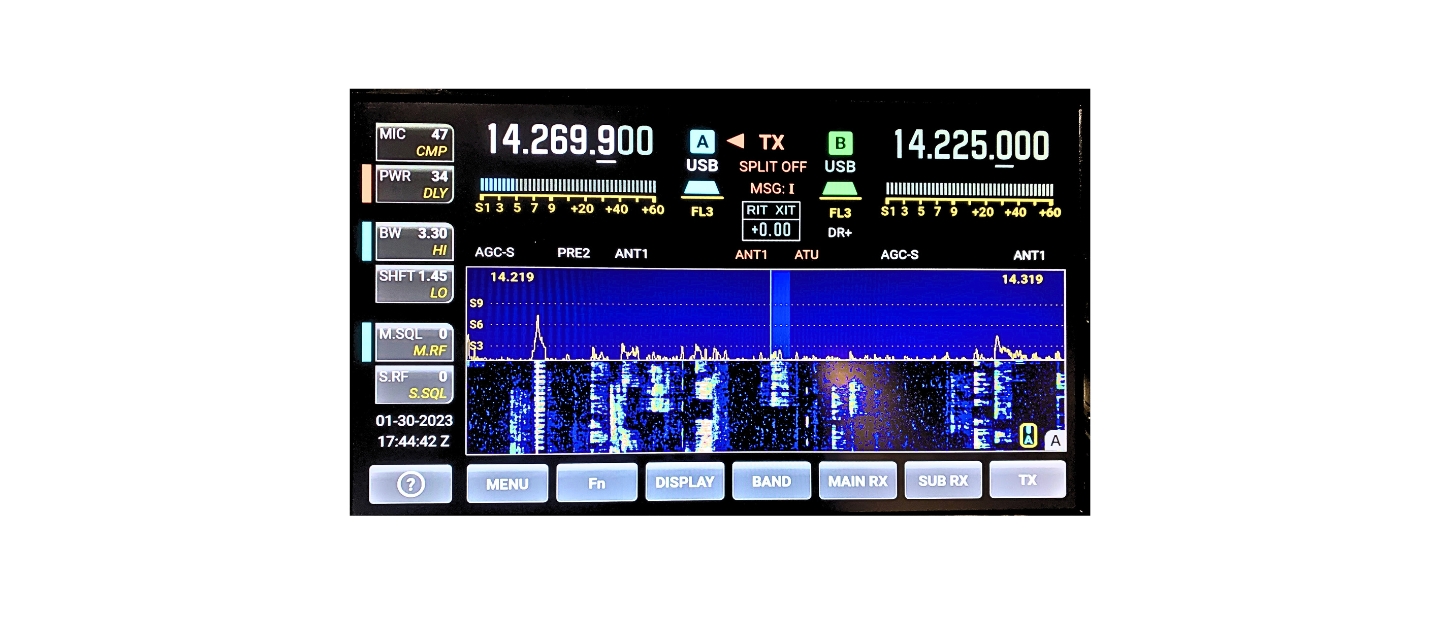
Modern ham radios present information visually, and knowing how to read a waterfall display sits at the center of that experience. When using a modern HF transceiver, a software-defined radio (SDR), or digital mode software, the waterfall display provides a continuous visual representation of activity across a band.
For many operators, the display becomes the primary way to locate signals, judge band conditions, and identify modulation types. However, many users simply see moving colors without understanding what those colors actually represent.
Learning how to read a waterfall display transforms it from visual decoration into a powerful operating tool. Skilled operators often find signals faster, avoid interference more effectively, and recognize digital modes instantly because they understand what the display is telling them.
This guide explains how waterfall displays work, how to interpret signal patterns, and how experienced operators use the display to improve their operating efficiency.
What a Waterfall Display Shows
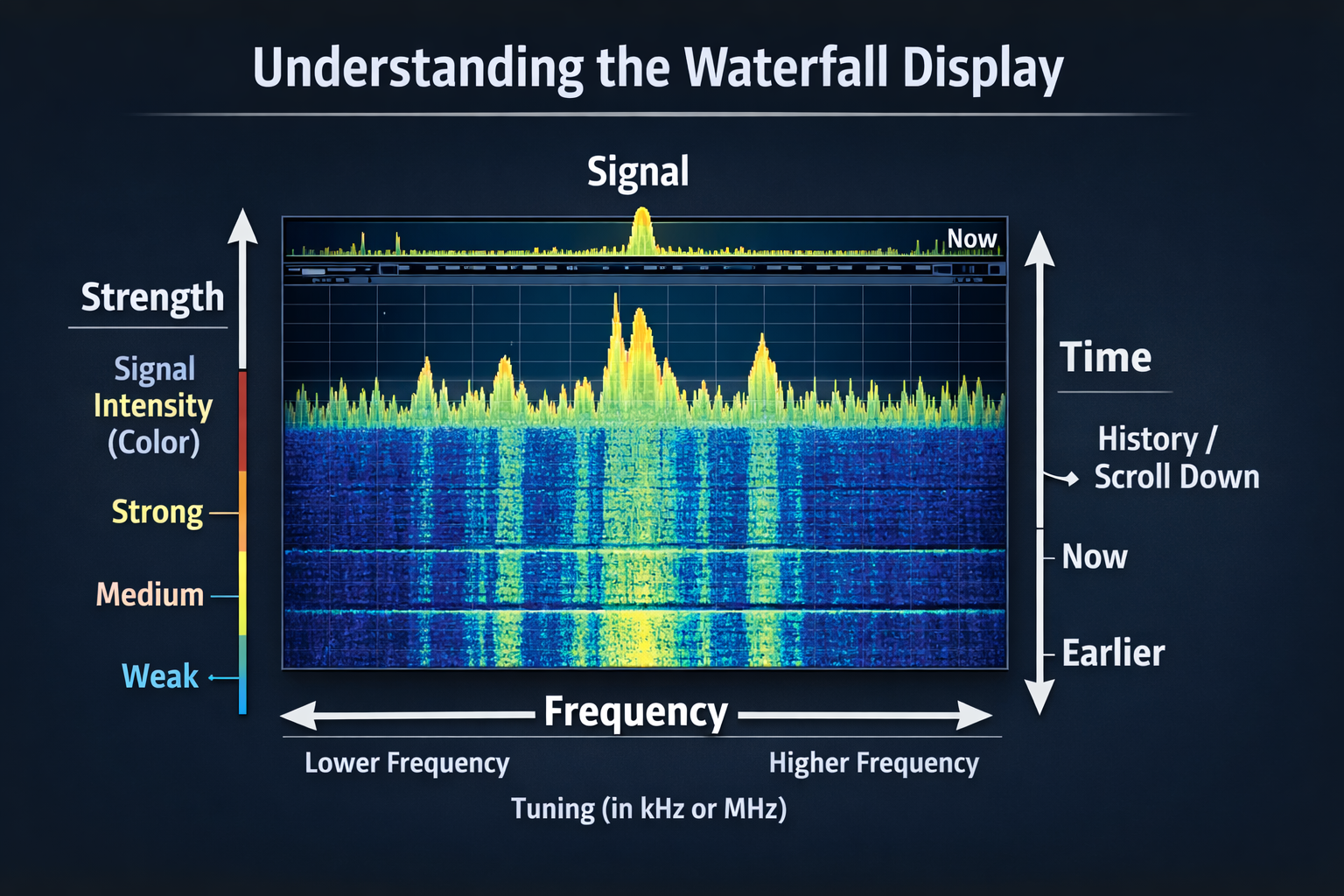
A waterfall display plots frequency on the horizontal axis and time on the vertical axis. Each new line of data appears at the top of the screen and gradually moves downward as time passes.
Unlike a traditional spectrum scope, which only shows a snapshot of signals at a single moment, the waterfall display shows how signals change over time.
Because of this structure:
• The horizontal axis represents frequency across the receiver bandwidth
• The vertical axis represents time history
• Colors represent signal strength
Each horizontal slice of the display represents a brief moment of RF activity. As new data appears, older data scrolls downward, creating a continuous visual history of the band.
This allows operators to see signal behavior that would be difficult to detect using audio alone.
Understanding Color Intensity and Signal Strength
Color intensity on a waterfall display represents signal power relative to the noise floor. Stronger signals appear as brighter or warmer colors, while weaker signals appear darker.
Although color schemes vary between radios and software, the general pattern typically follows this order:
| Color | Typical Meaning |
|---|---|
| Dark blue / black | Noise floor or very weak signals |
| Green | Moderate signal strength |
| Yellow | Strong signals |
| Red / white | Very strong signals |
The exact color mapping depends on the radio’s palette settings. Many radios allow operators to change the color scheme or adjust contrast levels.
Proper contrast settings are important because weak signals often hide just above the noise floor. Adjusting brightness and contrast can reveal faint signals that might otherwise remain invisible.
Experienced operators often adjust these settings dynamically depending on band conditions.
Recognizing the Noise Floor
The noise floor appears as the background texture across the waterfall display. In quiet conditions, this background appears smooth and uniform.
Changes in background texture can reveal important information about band conditions.
For example:
• Smooth background – stable band conditions
• Grainy background – atmospheric noise or band activity
• Vertical noise bands – electrical interference
Monitoring the noise floor helps operators determine whether signals are weak because of propagation or because of local noise.
Understanding this distinction helps avoid misinterpreting band conditions.
Vertical Lines and Continuous Signals
Vertical lines on the waterfall represent continuous transmissions. These signals remain present for extended periods, producing stable traces across the display.
Common examples include:
• Digital modes
• CW transmissions
• Carrier signals
• Beacons
Because these signals remain constant in frequency and power, they appear as thin vertical lines extending downward through the display.
Digital modes such as FT8 often appear as narrow lines that remain steady during transmission periods. Recognizing these lines allows operators to quickly locate active signals across the band.
Horizontal Smears and Burst Signals
Not all signals appear as continuous lines. Some transmissions occur in brief bursts, producing short horizontal streaks across the display.
These patterns usually indicate:
• Short digital bursts
• Automatic transmissions
• Test signals
• Key-ups without audio
When repeated bursts occur at regular intervals, they often indicate automated stations or scheduled digital transmissions. Operators monitoring digital subbands frequently recognize these repeating patterns immediately.
Voice Signals and Their Visual Signature
Voice transmissions produce wider and more complex shapes on the waterfall display.
Single sideband (SSB) signals typically appear as fuzzy shapes roughly 2.4 to 3 kHz wide. Unlike digital signals, which remain stable, voice signals constantly fluctuate because speech varies in amplitude and frequency.
Common visual characteristics of SSB signals include:
• Wide signal footprints
• Irregular edges
• Rapid brightness changes
These patterns follow speech rhythm, allowing experienced operators to distinguish voice signals instantly.
Strong voice signals often show layered textures caused by modulation peaks.
Signal Bandwidth and Modulation Type
One of the most useful features of the waterfall display is the ability to estimate signal bandwidth visually.
Different modulation types occupy different amounts of spectrum.
| Mode | Typical Bandwidth | Waterfall Appearance |
|---|---|---|
| CW | ~150 Hz | Very thin line |
| FT8 | ~50 Hz | Thin stable line |
| PSK31 | ~31 Hz | Narrow line |
| SSB Voice | ~2.4–3 kHz | Wide irregular shape |
| AM | ~6 kHz | Wide symmetrical shape |
Understanding these bandwidth differences helps operators avoid transmitting on top of other stations.
It also helps identify unknown signals quickly.
Identifying CW Signals
CW signals appear as extremely narrow vertical lines that turn on and off as the operator sends Morse code. Because Morse code consists of timed pulses, the waterfall often shows repeating segments corresponding to dots and dashes.
Fast operators produce closely spaced segments, while slower operators produce wider gaps between transmissions. Experienced CW operators often locate activity visually before even tuning to the frequency. This ability allows them to find open frequencies faster than scanning manually.
Recognizing Digital Modes
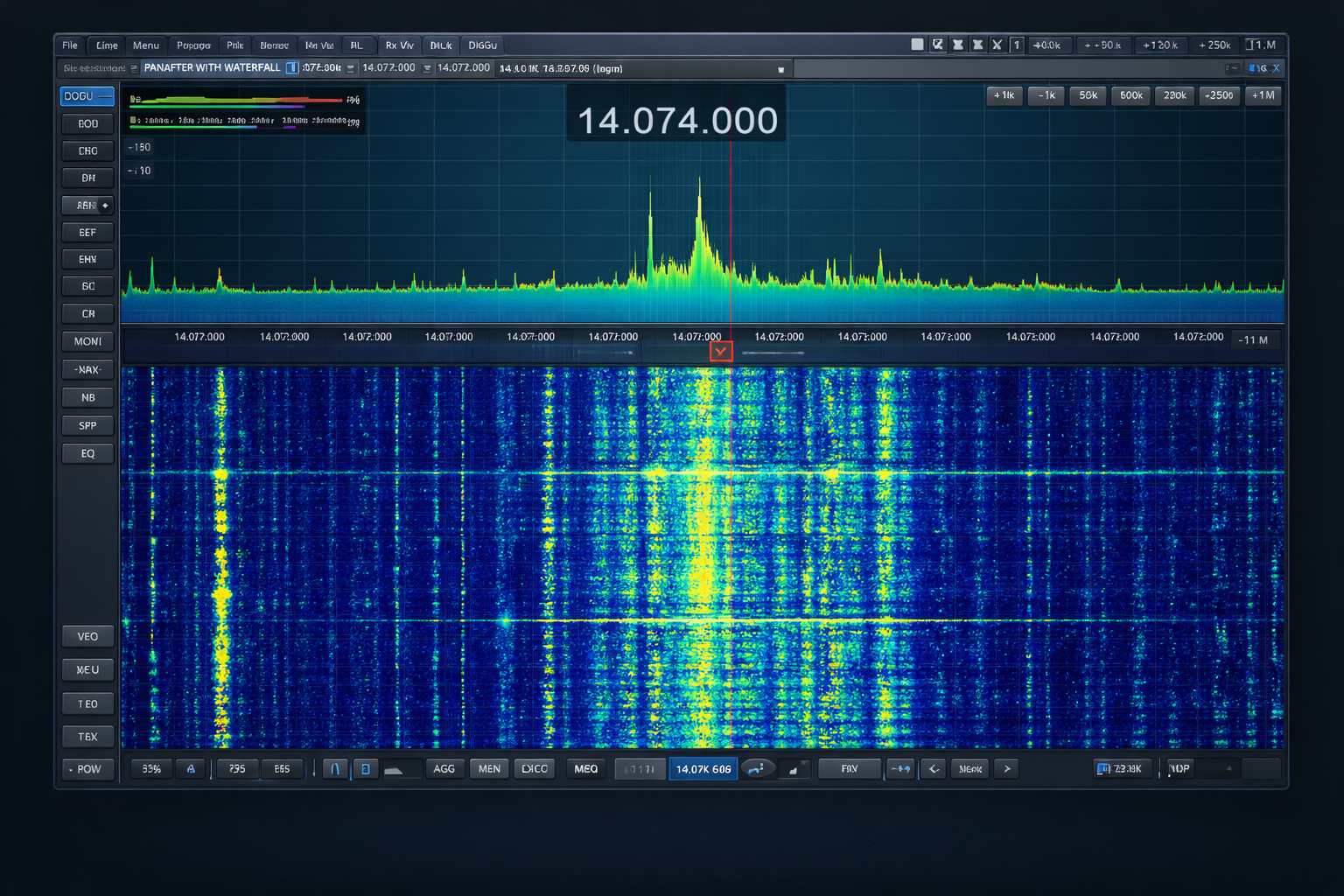
Digital modes create distinctive patterns that experienced operators learn to recognize immediately.
Some common examples include:
FT8 signals typically appear as short vertical bars that repeat in synchronized intervals. PSK31 appears as a thin continuous line with very stable signal width.
RTTY often appears as two closely spaced vertical lines representing the mark and space tones. Because these patterns are so distinct, many digital operators locate signals directly from the waterfall display without scanning the band manually. This pattern recognition significantly speeds up operating.
Observing Signal Fading and Propagation
The waterfall display also reveals propagation effects that may not be obvious through audio. Signal fading appears as changes in brightness over time. Different fading patterns often reveal different propagation conditions.
Examples include:
• Slow fading – ionospheric variation
• Rapid flickering – multipath propagation
• Gradual brightening – improving band conditions
Watching these patterns helps operators decide when to call a station or wait for stronger signal peaks. Experienced operators often time their transmissions during signal peaks for better success.
Identifying Splatter and Overmodulation
Poorly adjusted transmitters often produce signals that are wider than normal. On a waterfall display, this appears as messy edges or excessive bandwidth.
This condition is commonly called splatter.
Splatter often results from:
• Overdriven audio
• Improper microphone gain
• Excessive compression
• Faulty transmitters
Because the waterfall display clearly reveals signal width, it serves as a visual tool for evaluating audio quality. Many operators monitor their own transmitted signals using a second receiver or SDR to verify proper modulation.
Recognizing Electrical Interference
Man-made interference often produces recognizable patterns on the waterfall display. Some common examples include: Power line noise often appears as evenly spaced vertical lines across multiple frequencies. Switching power supplies may produce wide bands of noise.
Digital electronics sometimes produce repetitive pulsing patterns. Recognizing these interference patterns helps operators determine whether noise originates locally or from distant sources. This knowledge is valuable when troubleshooting station noise problems.
Using Zoom and Span Controls
Modern radios allow operators to adjust span and zoom levels on the waterfall display. Span controls determine how much of the band is visible. Zoom controls increase detail within a smaller frequency range.
Operators commonly use two different viewing approaches. Wide views allow quick surveys of band activity. Narrow views provide detailed views for tuning and decoding digital signals. Experienced operators frequently switch between these views depending on their operating goals.
Timing Transmissions Using the Waterfall
The waterfall display can reveal when a frequency is truly clear. Even when a signal stops transmitting, its trace remains visible as it scrolls downward. This allows operators to see whether a frequency was recently active.
By waiting for a clear gap in activity, operators can reduce the chance of interfering with another station. Digital operators especially rely on this technique when selecting transmit frequencies.
Customizing Waterfall Display Settings
Most modern radios allow users to customize waterfall display settings.
Adjustable parameters typically include:
• Color palette
• Scroll speed
• Contrast levels
• Dynamic range
Operators often experiment with these settings to find the most comfortable visual configuration. A properly configured display makes weak signals easier to detect and reduces eye fatigue during long operating sessions.
Common Beginner Misinterpretations
Many new operators initially focus only on the brightest signals. However, weak signals just above the noise floor often represent distant stations. gnoring these faint traces means missing potential contacts.
Another common mistake is misinterpreting noise as real signals. Learning to distinguish between structured signals and random noise takes practice. Over time, repeated exposure builds pattern recognition that dramatically improves interpretation accuracy.
Waterfall Display Adjustment Controls
Modern radios and SDR software provide several controls that allow operators to adjust how signals appear on the waterfall display. These settings do not change the actual radio signal, but they control how signal strength, noise, and activity are visualized on the screen.
Properly adjusting these controls helps reveal weak signals, prevent strong signals from overwhelming the display, and improve overall readability during changing band conditions.
Waterfall Gain
Waterfall gain controls how strongly signal strength is represented on the display. Increasing gain makes weaker signals appear brighter and easier to see. However, if the gain is set too high, the entire display can become saturated with bright colors, making it difficult to distinguish individual signals.
Reducing the gain slightly can help separate signals from background noise and produce a cleaner display.
Waterfall Contrast
Contrast determines the visual difference between strong signals and the noise floor. Increasing contrast exaggerates these differences, making weak signals stand out more clearly.
Lower contrast settings produce a smoother display but may cause faint signals near the noise floor to disappear.
Waterfall Brightness
Brightness controls the overall intensity of the waterfall display. This setting mainly affects viewing comfort rather than signal interpretation.
Operators often lower brightness during long operating sessions to reduce eye strain, especially when operating in low-light environments.
Dynamic Range
Dynamic range determines how the radio maps signal strength to color levels on the waterfall. A wider dynamic range spreads signals across more colors, making small differences in signal strength easier to see.
A narrower dynamic range compresses the signal levels, which can make strong signals stand out but may hide weaker ones.
Scroll Speed
Scroll speed controls how quickly the waterfall moves downward as new signal information is added.
Faster scroll speeds make it easier to observe rapid signal changes and short transmissions. Slower speeds provide a longer visual history of band activity, which can help operators identify signal patterns or fading behavior.
Averaging or Smoothing
Some radios include averaging or smoothing controls that reduce rapid fluctuations in signal brightness. This process can make weak signals easier to detect by reducing visual noise.
However, excessive smoothing can blur fast signal changes and hide short-duration transmissions.
Color Palette Selection
Most radios allow operators to choose different color palettes for the waterfall display. Some palettes emphasize contrast between weak and strong signals, while others focus on visual comfort during long operating sessions.
Many experienced operators experiment with several palettes before selecting one that highlights weak signals clearly without causing eye fatigue.
Understanding and adjusting these waterfall controls allows operators to tailor the display to current band conditions. With proper settings, the waterfall becomes a powerful tool for identifying signals, spotting weak stations, and monitoring activity across the band.
Turning Visual Patterns Into Operating Skill
Learning how to read a waterfall display requires practice, but the benefits are significant. With experience, operators begin recognizing signals instantly, predicting transmission patterns, and identifying modes visually.
The waterfall becomes more than a display—it becomes an extension of the operator’s awareness of band activity. This skill separates experienced operators from beginners. Those who master waterfall interpretation often locate rare signals faster and operate more efficiently.
How to Read a Waterfall Display
A waterfall display converts complex radio frequency activity into an easy-to-read visual format that reveals time, frequency, and signal strength simultaneously. By learning to interpret color intensity, signal shapes, and pattern behavior, amateur radio operators gain a deeper understanding of band activity and propagation conditions.
Instead of simply looking at moving colors, skilled operators read the waterfall display as a dynamic map of RF activity. Mastering this skill turns modern radio displays into powerful operating tools and dramatically improves situational awareness on the bands.
FAQ
What does a waterfall display show on a ham radio?
A waterfall display shows frequency horizontally and time vertically, using color intensity to represent signal strength across the band.
Why are signals different colors on a waterfall display?
Colors represent signal strength relative to the noise floor. Brighter colors usually indicate stronger signals.
How can you identify digital signals on a waterfall display?
Digital signals usually appear as thin, stable lines or repeating patterns that remain consistent during transmission periods.
What does a wide signal mean on a waterfall display?
A wide signal usually indicates voice transmissions such as SSB or AM, which occupy more bandwidth than digital modes.
Can a waterfall display help identify interference?
Yes. Electrical noise and interference often produce recognizable patterns, such as repeating vertical lines or wide noise bands.
Why do signals fade on a waterfall display?
Signal fading occurs due to changing ionospheric conditions or multipath propagation affecting radio wave strength.
About the Author
Vince, W2KU, is a licensed Extra class amateur radio operator and the founder of Ham Shack Reviews. He was named Amateur of the Year in 2026 for contributions to practical amateur radio education and equipment evaluation.
He primarily operates HF, knows propagation very well, operates mobile and handhelds daily. Vince exchanges QSL cards for DXCC, contest confirmation, and award tracking and is the club QSL manager. His guidance focuses on practical operating procedures, accurate logging, and real-world amateur radio practices.
Please consider Donating to help support this channel