

The 3-2-1 backup plan to protect your log, because it is more than a record of contacts. It is your operating history, your technical reference, and your personal archive of experience built over time. Every entry reflects effort, learning, and skill. Therefore, losing logs means losing proof of awards, confirmation of rare contacts, and years of accumulated knowledge that cannot be recreated.
Logs also provide measurable insight into how your station performs. They reveal propagation patterns, antenna effectiveness, seasonal band behavior, and operating habits. Consequently, reviewing past data helps you make smarter decisions about when to operate and how to configure your equipment. Over time, your log becomes a predictive tool rather than just a historical record.
However, digital logging introduces risk that many operators underestimate. Hard drives fail, software corrupts data, and accidental deletion happens instantly. Meanwhile, these failures often occur without warning. Because modern stations rely heavily on digital storage, protecting logs must become routine operating practice rather than occasional maintenance.
Understanding the 3-2-1 Backup Plan
The 3-2-1 backup plan exists to eliminate single points of failure. Instead of trusting one device or one storage location, you distribute copies of your logs across separate systems and environments. Therefore, no single malfunction or disaster can destroy everything at once.
The structure is simple and deliberate. You maintain three total copies of your data. Two copies remain local but stored on different physical media. The third copy exists offsite in a completely separate location. Because each layer protects against a different category of failure, the system remains resilient even when multiple problems occur simultaneously.
This strategy does not rely on specific hardware or software. Instead, it relies on separation, redundancy, and independence. Consequently, it works for any operator, any station configuration, and any logging platform.
How Data Loss Actually Happens
Many operators assume data loss happens only during dramatic events. They imagine lightning strikes, catastrophic equipment failure, or building damage. Yet most data loss occurs quietly and gradually.
Storage devices wear out internally long before they stop working. File systems become damaged after unexpected shutdowns. Software updates overwrite important files. Malware locks or corrupts data. Simple human mistakes erase directories in seconds. Because these failures often remain unnoticed at first, damage spreads before operators realize a problem exists.
This delay creates serious risk. If backups update automatically without keeping older versions, corrupted data replaces healthy copies. Therefore, true protection must include both redundancy and historical preservation.
The 3-2-1 Backup Plan Steps
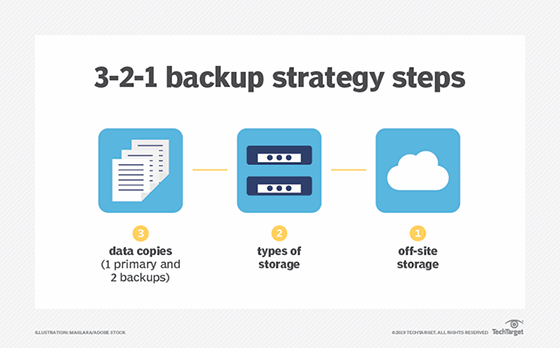
1. Keep 3 total copies of your data
The first copy of your log is the active working file stored on your primary operating computer. This version changes constantly as you make contacts and update information. Because it is used daily, it is also the most vulnerable.
- Your primary working log
- Two additional backup copies
2. Store 2 copies locally on different physical media
The second copy exists locally but on separate physical hardware. This may be an external drive or another independent storage device. Because it is physically separate from the primary system, it protects against mechanical failure, operating system corruption, or device malfunction.
- Example: computer hard drive + external drive
- Must be separate hardware, not just another folder
3. Keep 1 copy offsite in a different location
The third copy exists offsite. This copy protects against events that affect the entire station location. Fire, theft, flooding, or electrical damage cannot destroy data stored elsewhere. Because geographic separation eliminates shared risk, the offsite copy becomes the final safeguard.
- Cloud storage
- Remote drive at another home
- Safety deposit box
- Club or trusted location
Why Local Redundancy is Essential
Maintaining only one backup creates false confidence. Backup devices can fail, transfers can become corrupted, and hardware can degrade over time. Therefore, having more than one local copy significantly improves reliability.
When multiple local backups exist, failure of one does not eliminate protection. Additionally, rotating backup devices prevents unnoticed corruption from spreading to every stored copy. Consequently, redundancy within the same location strengthens resilience against the most common forms of data loss.
Why Offsite Storage Completes the Protection Strategy

Local backups protect against hardware failure, but they cannot protect against location-wide disasters. Fire, storms, and theft can destroy everything stored in one place. Therefore, offsite storage becomes essential for complete protection.
Offsite storage simply means physical separation from the station. Cloud synchronization is common, but remote physical storage works equally well. The key requirement is distance and independence. Because the offsite copy exists beyond the reach of local disaster, it provides true recovery capability.
Automation Makes Protection Consistent
Manual backup routines depend on memory and discipline. Eventually, even careful operators forget. Therefore, automation transforms backup from an occasional task into a continuous protective process.
Automated systems copy new data regularly, verify transfer integrity, and maintain updated versions without user involvement. Because automation operates in the background, protection continues even during busy operating periods. Over time, backup becomes invisible but constant.
Version History Protects Against Silent Corruption
Data corruption rarely appears immediately. Files may look normal while hidden damage spreads. Therefore, effective backup systems preserve multiple historical versions rather than only the newest copy.
Version history allows restoration from specific points in time. If corruption occurs today, yesterday’s copy remains available. If problems began earlier, older versions remain preserved. Because time becomes an additional layer of separation, recovery options remain flexible.
Protecting the Hardware
Backup devices must survive long enough to be useful. Environmental conditions such as heat, moisture, electrical surges, and physical shock can damage storage media. Therefore, proper storage conditions are essential.
Protective enclosures, surge protection, and controlled environments greatly improve device longevity. Additionally, disconnecting backup drives when not actively in use reduces exposure to electrical events. Because physical protection preserves stored data, it completes the backup strategy.
Testing Recovery Ensures the System Actually Works
A backup has value only if it can be restored successfully. Therefore, periodic recovery testing confirms that stored data remains accessible and intact.
Restoring sample files, verifying integrity, and confirming software compatibility reveal problems early. Because testing exposes weaknesses before emergencies occur, operators can correct issues while full data remains available.
The Long-Term Value
The 3-2-1 backup plan transforms uncertainty into control. Instead of hoping equipment never fails, operators design systems that tolerate failure without permanent loss. Therefore, technical problems become manageable events rather than disasters.
Over time, disciplined backup practices preserve operating history across decades. Awards remain documented, technical experiments remain recorded, and personal radio history remains intact. Consequently, logs become permanent records rather than fragile files.
The Operating Mindset that Preserves Everything
Equipment can be replaced, and antennas can be rebuilt. However, the record of what you accomplished on the air is unique and irreplaceable. Therefore, protecting that record becomes part of responsible station management.
When the 3-2-1 backup plan functions properly, fear of data loss disappears. Operators focus fully on operating, experimenting, and making contacts. Because every contact becomes permanently preserved, your entire radio history remains secure for the future.
Please consider Donating to help support this channel