Logbook of The World (LoTW) provides one of the most trusted confirmation systems in amateur radio. However, why LoTW uploads fail, stall, or produce confusing errors. When that happens, operators often assume the system is broken. In reality, most failures come from configuration mismatches, certificate problems, or data formatting issues.
Once you understand the common causes, you can diagnose and fix nearly every upload problem quickly. This guide explains exactly why LoTW uploads fail and how to correct each issue step by step. It also shows how to prevent future failures so your confirmations process smoothly every time.
For a deeper look at logging programs, digital mode software, contest tools, and station control applications, see the Complete Guide to Ham Radio Software.
What LoTW Actually Requires to Accept an Upload
LoTW does not simply accept log files. Instead, it verifies identity, location, and contact data simultaneously. Therefore, every upload must pass multiple validation checks before the system accepts it.
Specifically, LoTW requires:
A valid certificate tied to your callsign
A matching station location
Correct time and date information
Properly formatted log data
Verified digital signing through TQSL
If any of these elements conflict, the upload fails. Consequently, troubleshooting always starts by identifying which requirement did not pass validation.
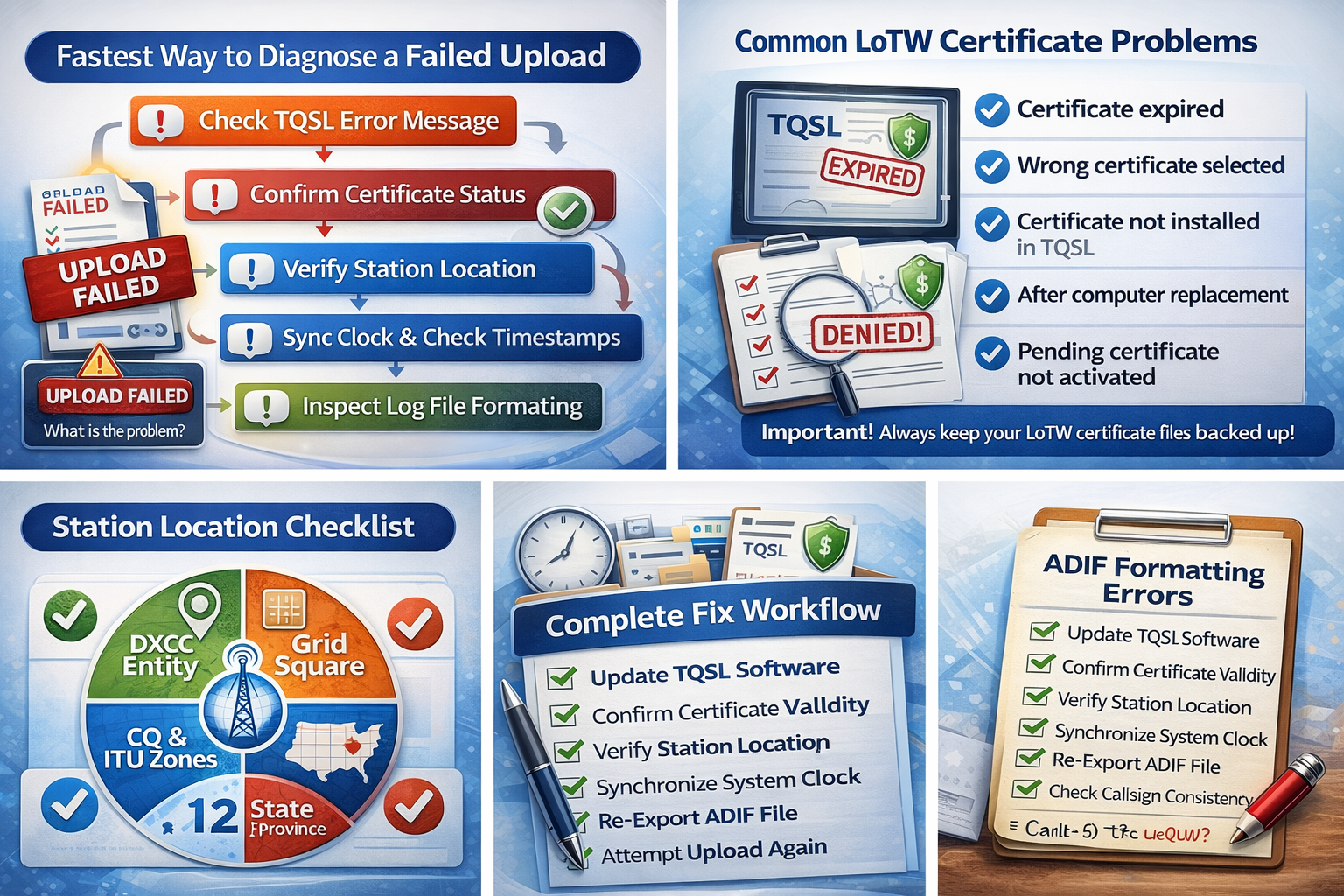
The Fastest Way to Diagnose a Failed Upload
Before making random changes, follow a structured check. This saves time and prevents new configuration problems.
First, read the exact error message in TQSL. Although many operators skip this step, the message usually points directly to the cause.
Next, confirm your certificate status. If the certificate expired, LoTW will reject the upload immediately.
Then verify your station location. Even a small mismatch can cause failure.
After that, review your computer’s system clock. LoTW requires accurate timestamps.
Finally, inspect your log file formatting. Invalid fields or missing data often block uploads.
By following this order, you eliminate the most common problems first.
Certificate Problems That Stop Uploads
Certificate issues cause more LoTW upload failures than any other factor. Because LoTW verifies operator identity cryptographically, certificate errors immediately block processing.
Common certificate problems include:
Expired certificate
Wrong callsign certificate selected
Certificate not installed in TQSL
Certificate mismatch after computer replacement
Pending certificate that was never activated
If your certificate expired, request a renewal and install it before uploading. Meanwhile, if you use multiple callsigns, confirm that you selected the correct certificate when signing the log.
Sometimes operators reinstall TQSL or move to a new computer. In that case, the certificate may exist in LoTW but not on the local system. Therefore, you must restore the certificate backup or request a replacement.
Station Location Mismatch Errors
LoTW compares every QSO against a defined station location. If the uploaded contact does not match that location, LoTW rejects or ignores the record.
This problem often appears after moving, portable operation, or updating DXCC entities. For example, if your log shows a contact from a portable grid but TQSL signs it with your home station, LoTW flags the mismatch.
To fix this, open TQSL and verify the selected station location before signing. Additionally, confirm that the location profile contains accurate:
DXCC entity
Grid square
State or province
CQ zone and ITU zone
If you operate from multiple locations, create separate station profiles. Then select the correct one during signing.
Incorrect Time and Date Settings
LoTW depends heavily on precise timing. Therefore, incorrect computer clocks frequently cause rejected uploads.
If your system time differs significantly from actual UTC, LoTW may refuse the QSO data. This happens because confirmation matching relies on overlapping timestamps between stations.
To fix time errors:
Enable automatic internet time synchronization
Confirm UTC offset settings
Verify daylight saving adjustments
Check logging software time format
Many operators correct everything else yet overlook system time. However, once you fix the clock, uploads often succeed immediately.
Log File Format and ADIF Errors
LoTW expects properly formatted ADIF files. If required fields are missing or corrupted, the upload fails or processes incorrectly.
Common ADIF problems include:
Missing callsign fields
Invalid date formats
Unsupported band or mode names
Special characters in comments
Incorrect field length tags
Although logging software usually exports valid ADIF files, manual editing often introduces errors. Therefore, if you modified the file, re-export it from your logging program instead.
If problems persist, validate the ADIF file before signing. Many logging programs provide built-in validation tools.
Callsign and Operator Information Conflicts
LoTW strictly associates certificates with specific callsigns. Consequently, any mismatch between the log and certificate prevents successful upload.
Typical conflicts include:
Uploading logs for a different callsign
Using a club callsign without a matching certificate
Incorrect portable suffix formatting
Old callsign data still present in logs
If you changed callsigns, you must maintain separate certificates for each one. Meanwhile, ensure your logging software reflects the correct operator identity.
Duplicate QSO Handling Confusion
Sometimes uploads appear to fail when LoTW actually rejects duplicate records silently. This can happen if you re-upload the same log segment repeatedly.
Although duplicates do not harm your account, they may create the impression of failure. Therefore, confirm whether the QSO already exists in your LoTW log before troubleshooting further.
TQSL Configuration Errors
Trusted QSL (TQSL) performs the digital signing process. If TQSL is misconfigured, uploads cannot complete successfully.
Common configuration issues include:
Incorrect file paths
Outdated software version
Missing certificate storage directory
Improper signing options
Because software updates often include compatibility fixes, updating TQSL resolves many unexplained upload failures.
Internet Connection and Security Interference
Although less common, network issues can interrupt uploads. Firewalls, antivirus software, or restrictive routers sometimes block TQSL communication.
If uploads fail without clear error messages, temporarily disable security software and try again. If the upload succeeds, configure an exception for TQSL.
Additionally, LoTW servers occasionally undergo maintenance. During those periods, uploads may fail temporarily. Therefore, if everything appears correct locally, try again later.
Understanding Common LoTW Error Messages
Error messages often seem technical, yet they usually point directly to the solution.
Typical examples include:
“Certificate not found” — install or select the correct certificate “Station location does not match” — choose correct station profile “Invalid date or time” — fix system clock or log timestamps “Signing failed” — verify TQSL configuration “Upload rejected” — check ADIF formatting
Reading the message carefully saves significant troubleshooting time.
Step-By-Step Complete Fix Workflow
If you want a reliable repair sequence, follow this exact order:
Update TQSL software
Confirm certificate validity and installation
Verify selected station location
Synchronize system clock with UTC
Re-export ADIF file from logging software
Check callsign consistency
Attempt upload again
Review error message if failure continues
This process resolves nearly all LoTW upload problems.
How to Confirm Your Upload Actually Worked
After a successful upload, LoTW displays a confirmation message. However, verification should not stop there.
Log into your LoTW account and confirm that:
QSO count increased
Upload date appears correctly
Contacts show processing status
Sometimes uploads succeed but processing takes time. Therefore, allow the system to complete matching before assuming failure.
How AC Log and N1MM Logger+ Affect LoTW Uploads
Many LoTW upload failures do not originate inside TQSL. Instead, they begin inside the logging software that creates the ADIF file. Therefore, proper configuration in your logger directly determines whether LoTW accepts or rejects your upload.
Two commonly used logging programs are AC Log and N1MM Logger+. Both export valid ADIF files, yet incorrect settings inside either program frequently cause certificate mismatches, time errors, or station location conflicts.
If you use AC Log, confirm that your callsign, grid square, and DXCC entity match the station location defined in TQSL. Additionally, ensure the software records contacts in UTC. If AC Log stores contacts in local time, LoTW may reject them or fail to match confirmations.
When uploading from AC Log, export the QSOs as an ADIF file first. Then sign the file with the correct certificate in TQSL. Finally, upload the signed file to LoTW. If the upload fails, re-export the ADIF file and verify the station location before signing again.
If you use N1MM Logger+, configuration becomes even more important because the software often handles high-volume contest logs. First, confirm your station location inside N1MM matches the one defined in TQSL. Then verify that band and mode settings use standard ADIF naming conventions. Although N1MM stores precise timestamps, incorrect band definitions or outdated station profiles can still trigger LoTW rejection.
If LoTW rejects contacts from either program, compare three things immediately:
• Callsign format • Station location profile • UTC time settings
In most cases, correcting one of those elements resolves the issue without further troubleshooting.
By configuring your logging software correctly, you eliminate the majority of LoTW upload failures before they ever reach TQSL.
Preventing Future Upload Failures
Preventive setup eliminates most recurring problems. Because LoTW relies on precise data integrity, consistent configuration ensures smooth operation.
Best practices include:
Maintain automatic time synchronization
Backup certificates regularly
Use separate station profiles for portable operation
Update logging software frequently
Avoid manual ADIF editing when possible
Additionally, test small uploads before sending large logs. This allows quick correction if a problem appears.
Advanced Troubleshooting Using TQSL Logs
When basic fixes do not work, examine the TQSL diagnostic log. This file records detailed signing and upload activity.
Although many operators ignore it, the log often reveals:
Certificate validation failures
Field parsing errors
Network communication problems
File access conflicts
Reading the diagnostic log provides deeper insight into persistent failures.
Operator Experience and Practical Station Considerations
Experienced operators rarely encounter repeated upload failures because they standardize station configuration. Consistent logging practices, synchronized clocks, and organized certificate management eliminate most risks.
Portable operation introduces the highest failure rate. However, once you create proper station location profiles and verify them before signing, uploads become routine again.
Therefore, disciplined station management directly improves LoTW reliability.
Final Troubleshooting Checklist
If LoTW uploads fail, confirm the following in order:
Certificate valid and installed
Correct callsign selected
Accurate station location
System time synchronized
ADIF properly formatted
TQSL updated
Network connection functional
If all conditions are correct, uploads almost always succeed.
Frequently Asked Questions About LoTW Upload Failures
Why does LoTW accept the file but show no confirmations? Processing takes time. Meanwhile, matching requires the other station’s upload.
Can I upload the same log twice? Yes, but LoTW ignores duplicates.
Why do portable operations fail more often? Location mismatches occur frequently unless station profiles are configured correctly.
Does logging software matter? Most software works properly, yet incorrect export settings can cause formatting errors.
Why LoTW Uploads Fail and How to Fix Them
Why LoTW Uploads Fail from system problems. Instead, they result from identity verification conflicts, timing errors, or data mismatches. Once you understand how LoTW validates uploads, troubleshooting becomes straightforward and predictable.
By maintaining accurate certificates, correct station locations, synchronized time, and properly formatted logs, you ensure reliable confirmations and uninterrupted LoTW operation.
Please consider Donating to help support this channel